AnimateCloth Physics Free directly in your browser.
Spandolab is your personal motion playground — craft fluid SVG animations, design rich micro-interactions, and experiment with live physics directly in your browser. Draw vectors, sculpt keyframes with custom bezier curves, drop in Box2D cloth and 3D models, and export production-ready SVG+CSS, Lottie, WebM, MP4, GIF, or interactive HTML sandboxes in one click.
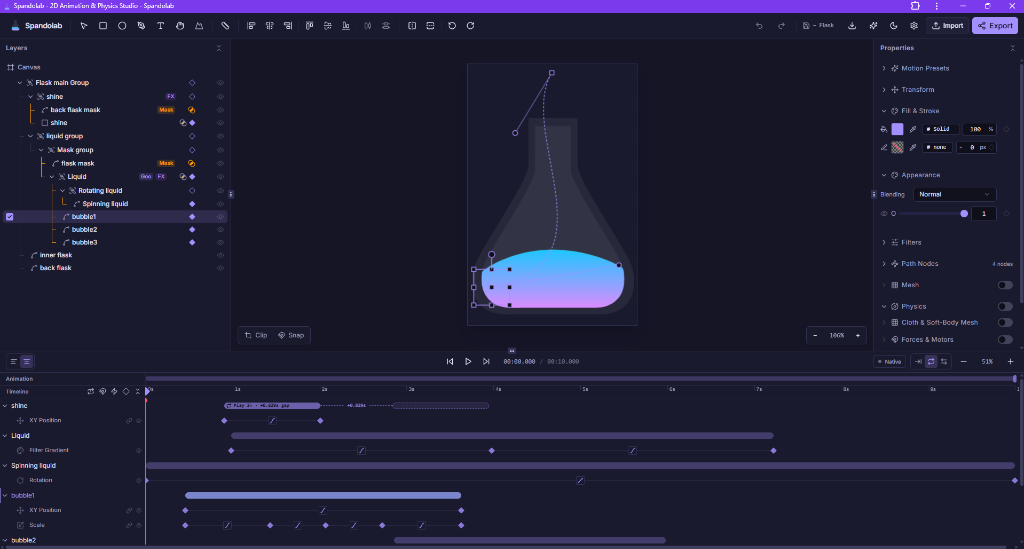
Explore the full power of Spandolab.
The exact same comprehensive guide built into the app — browsable, searchable, and always up to date.
Sound, 3D, Video, Physics — Animate & Export Everywhere.
No need to switch between five different apps. Spandolab combines vector animation, audio sync, 3D meshes, and Box2D physics into a single browser workspace — with instant export to lightweight SVG, Lottie JSON, alpha video, or interactive HTML sandboxes.
Box2D Rigid-Body Physics
Simulate real gravity, bounciness, friction, revolute joints, and wind forces. Grab, throw, and fling objects live with mouse or touch gestures.
Best for: Physics rigs, ragdolls, gravity sandboxes, kinetic mechanisms
- Collision Filtering & Masking
- Revolute Joints, Springs & Ropes
- Interactive Mouse Drag & Fling
- Zero-Jump Sub-stepping
More Info & Highlights
- •Joint System: Distance springs, ropes, prismatic sliders, revolute pin pivots, and weld joints.
- •Force Fields: Directional gravity, point attractors, repulsors, and fluid drag resistance.
- •Simulation Engine: Embedded Planck.js Box2D compiled to pure browser JS with zero WASM load delay.
Audio & Sound FX Sync
Import audio tracks, scrub visual waveforms on the timeline, and trigger sound effects dynamically on physical collisions and interactive state transitions.
Best for: Sound-reactive animations, explainer videos, game SFX, rhythmic sync
- Waveform Timeline Scrubbing
- Collision-Triggered Audio FX
- Volume & Cue Envelopes
- Stereo Opus / AAC Muxing
More Info & Highlights
- •Audio Scrubbing: Real-time audio pitch and sample scrubbing linked directly to timeline playhead.
- •Dynamic Triggers: Fire audio clips when physics bodies collide above a configurable impulse threshold.
- •Web Audio DSP: Native browser audio node graph with zero latency and high-precision sample alignment.
3D Models & Spatial Meshes
Bring 3D objects, lighting, and camera perspectives into your vector artboards. Animate 3D rotations and depth translations with smooth interpolation.
Best for: 3D product showcases, spatial vector layers, isometric motion, 3D text
- Hardware-Accelerated WebGL
- 3D Kinetic Text Extrusions
- Dynamic Lighting & Shadows
- GLTF / OBJ 3D Model Import
More Info & Highlights
- •Shader Pipeline: Custom Three.js materials with metallic, roughness, and normal map support.
- •Perspective Camera: Animate field-of-view, orbit focal point, and camera dolly paths alongside 2D layers.
- •Hybrid Rendering: Seamlessly layer 2D vector shapes in front of or behind 3D WebGL meshes.
Video Layers & Alpha VP9
Layer transparent video with lossless alpha channels directly inside your animations. Apply SVG displacement filters and mask video with vector paths.
Best for: Transparent video overlays, broadcast graphics, game UI, green-screen compositing
- Lossless Alpha Transparency
- Frame-Accurate Video Scrub
- Vector Mask Clipping
- WebCodecs Hardware Decode
More Info & Highlights
- •Alpha Compositing: Full support for VP9 ProRes alpha, WebM alpha, and canvas blend modes.
- •Timeline Sync: Video frames bind to timeline keyframes for frame-by-frame forward and reverse playback.
- •Filter Stacking: Apply chromatic aberration, blur, goo, and color grading directly over video layers.
Interactive State Graph
Build micro-interactions, interactive button states, and mini-games visually with click/hover event triggers and transition ease curves.
Best for: Interactive UI prototypes, design systems, clickable components, game mechanics
- Event Triggers (Click/Hover)
- Seamless State Transitions
- Variable Logic & Counters
- Exportable to HTML Sandbox
More Info & Highlights
- •Finite State Machine: Visual nodes and transition arrows connecting poses and keyframe loops.
- •Interactive Preview: Test hover, press, release, and drag gestures directly in the editor canvas.
- •State Persistence: Component states can react to global signals and physics simulation events.
Liquid Goo & SVG Filters
Create metaball liquid goo effects, organic morphing shapes, turbulence noise, and Gaussian glows using high-performance SVG filter chains.
Best for: Organic blob UI, fluid drop simulations, neon glow effects, procedural morphs
- Metaball Liquid Goo
- Fractal Noise & Turbulence
- Color Matrix & Gaussian Glow
- GPU Hardware Accelerated
More Info & Highlights
- •Metaball Shader: Threshold color matrix applied over blurred vector shapes creates seamless fluid merging.
- •Perlin Turbulence: SVG feTurbulence creates real-time water ripple and displacement distortion.
- •Zero Raster Bloat: 100% mathematical vector filters rendered natively by the browser GPU.
Cloth & Soft Body Physics
Animate realistic cloth drape, waving banners, soft ropes, tearing meshes, and elastic jelly bodies with real-time mouse tearing and wind gusts.
Best for: Waving flags, curtains, rope bridges, dangling cables, soft elastic characters
- Real-Time Verlet Integration
- Dynamic Wind Turbulence
- Interactive Pin & Drag
- Tearable Elastic Meshes
More Info & Highlights
- •Verlet Particle Grid: High-speed constraint solver calculates thousands of spring nodes per frame without lag.
- •Wind & Aerodynamics: Procedural gust vectors react realistically across cloth surface geometry.
- •Interactive Interaction: Slice ropes and rip cloth live with mouse drag gestures in preview or exports.
Motion & Group Presets
Apply production-grade animation curves, group staggers, spring bounces, and kinetic text reveals to any selection in a single click.
Best for: Staggered lists, button pop micro-interactions, entrance reveals, kinetic choreography
- Group Stagger & Cascade
- Spring Physics & Overshoot
- 1-Click In / Out Presets
- Custom Preset Library
More Info & Highlights
- •Stagger Generator: Automatically offsets keyframe timings across child layers with linear or ease curve spacing.
- •Reusable Styles: Save animated compound assemblies into your personal preset library for instant reuse.
- •Batch Application: Animate hundreds of vector layers simultaneously without manual keyframe placement.
Custom Curves & Line Offsets
Fine-tune every movement with a full visual curve editor. Animate stroke dash offsets, trims, taper widths, and multi-color gradient shifts seamlessly.
Best for: Self-drawing line art, glowing neon borders, gradient sweeps, tailored deceleration curves
- Interactive Bezier Tangents
- Stroke Dash Offset & Trim
- Multi-Stop Gradient Morphs
- Per-Property Easing Control
More Info & Highlights
- •Visual Bezier Editor: Adjust incoming/outgoing velocity handles with millisecond precision.
- •Stroke Line Engine: Animate line start/end trims to create effortless hand-drawn outline write-on effects.
- •Gradient Motion: Morph linear and radial color stops smoothly across keyframe intervals.
Vector Masks & Alpha Clipping
Clip video, 3D canvases, and complex vector illustrations inside dynamic animated shapes with feathered borders and inverted alpha modes.
Best for: Complex UI reveal transitions, video framing, holographic lens effects, cutout typography
- Animated Path Clipping
- Inverted & Alpha Masks
- Multi-Layer Group Clipping
- Zero Pixel Artifacts
More Info & Highlights
- •Dynamic Masking: Move, rotate, and morph mask shapes while the underlying content animates independently.
- •Sub-Pixel Clipping: Crisp mathematical vector boundaries render flawlessly at Retina and 4K resolutions.
- •Universal Export: Export masked compositions seamlessly to SVG, Lottie JSON, or WebM alpha video.
Loop Tweens & Auto-Unroll
Stop duplicating keyframes — focus on animating. Set loop counts or infinite cycles on timeline tweens, and let Spandolab automatically unroll loops into production-ready layer sequences on export.
Best for: Walk cycles, rotating UI loaders, rhythmic pulsing badges, ambient motion loops
- 1-Click Timeline Tween Loops
- Auto Unroll Loops to Layers
- Zero Keyframe Duplication
- Seamless Lottie & SVG Export
More Info & Highlights
- •Focus on Animating: Design a single motion cycle once without cluttering your timeline with repetitive copy-pasting.
- •Unroll Loop to Layers: Automatic export engine expands loop repetitions into continuous, production-ready keyframes for any target format.
- •Massive Time Savings: Tweak the source cycle in one place, and all repetitions across your composition update instantly.
SVG + CSS Keyframes
Pure vector code with standalone CSS keyframe animations. Tiny footprint, infinite resolution, zero external dependencies.
Best for: Web UI icons, loading spinners, responsive logos, lightweight hero assets
- Zero blur at any scale
- Self-contained CSS @keyframes
- Inline or <img src>
- Embeds directly in HTML/React
More Info & Highlights
- •Ultra-Light: Typical files are 2KB - 15KB with zero JavaScript runtime overhead.
- •Responsive: Scales cleanly to any viewport width and Retina / 4K display density without quality loss.
- •CSS Variables: Easily override colors, timing, and speed via standard CSS variables in your design system.
Lottie JSON
Industry-standard JSON animations for native mobile applications (iOS, Android, React Native) and web players.
Best for: Mobile app onboarding, micro-interactions, animated stickers, multi-platform apps
- Bodymovin & Universal profiles
- Vector path morphing
- Color stop gradients
- Text as outlines
More Info & Highlights
- •Cross-Platform: Compatible with lottie-react, lottie-ios, lottie-android, and Telegram animated stickers.
- •Sub-Frame Interpolation: Buttery smooth 60/120 FPS playback governed by device refresh rate.
- •Asset Embedding: Embedded raster textures and fonts can be packaged directly into a single portable JSON file.
WebM (VP9 + Alpha)
Modern video codec supporting genuine alpha transparency channels and high-fidelity Opus soundtrack muxing.
Best for: Transparent video overlays, broadcast graphics, game UI, stream alerts
- True alpha transparency
- Opus stereo audio mix
- Optimized file sizes
- 60 FPS smoothness
More Info & Highlights
- •Transparent Channel: Eliminates black or white background rectangles for true floating video overlays.
- •Modern Web Video: Supported natively across Chrome, Firefox, Edge, and modern Chromium engines.
- •WebCodecs Render: Multi-threaded hardware acceleration renders long videos in seconds.
MP4 (H.264 + AAC)
The most broadly shareable video format with crystal clear AAC audio track synchronization.
Best for: Social media, marketing reels, Discord, presentation decks, video editors
- H.264 universal playback
- AAC high-fidelity audio
- Custom resolution scaling
- Frame-accurate rasterization
More Info & Highlights
- •Universal Compatibility: Plays everywhere on iOS, Android, macOS, Windows, QuickTime, and Premiere.
- •Resolution Scaling: Export from 480p up to 4K Ultra HD at 24, 30, or 60 FPS.
- •Audio Sync: Sample-accurate audio muxing guarantees lip-sync and beat alignment.
High-Quality GIF
Palette-quantized animated GIF with upng/gifski algorithms for crisp edges without color banding.
Best for: GitHub READMEs, Slack, email newsletters, documentation
- Palette quantization
- Custom quality control
- Loop count setting
- Universal compatibility
More Info & Highlights
- •NeuQuant / Gifski: Smart color quantization selects the optimal 256-color palette per frame.
- •Spatial Dithering: Smooths color gradients without harsh banding or noisy grain artifacts.
- •Lossless Deduplication: Static frame areas are compressed to drastically reduce output file size.
Interactive HTML Sandbox
A single self-contained .html file packaging the live Box2D physics simulation, 3D WebGL renderer, and interactive physics grab.
Best for: Embeddable interactive widgets, physics sandboxes, mini-games, portfolio demos
- Embedded Planck Box2D engine
- Mouse grab & fling
- Drop straight into <iframe>
- Runs 100% offline
More Info & Highlights
- •Single-File Artifact: HTML, CSS, JavaScript, and asset bundles inlined into one standalone .html file.
- •No Server Needed: Double-click to open in any web browser without hosting, node, or internet access.
- •Interactive Controls: Exposes physics gravity sliders, pause/play, reset, and layer inspection controls.
Box2D Rigid-Body Physics
Simulate real gravity, bounciness, friction, revolute joints, and wind forces. Grab, throw, and fling objects live with mouse or touch gestures.
Best for: Physics rigs, ragdolls, gravity sandboxes, kinetic mechanisms
- Collision Filtering & Masking
- Revolute Joints, Springs & Ropes
- Interactive Mouse Drag & Fling
- Zero-Jump Sub-stepping
More Info & Highlights
- •Joint System: Distance springs, ropes, prismatic sliders, revolute pin pivots, and weld joints.
- •Force Fields: Directional gravity, point attractors, repulsors, and fluid drag resistance.
- •Simulation Engine: Embedded Planck.js Box2D compiled to pure browser JS with zero WASM load delay.
Audio & Sound FX Sync
Import audio tracks, scrub visual waveforms on the timeline, and trigger sound effects dynamically on physical collisions and interactive state transitions.
Best for: Sound-reactive animations, explainer videos, game SFX, rhythmic sync
- Waveform Timeline Scrubbing
- Collision-Triggered Audio FX
- Volume & Cue Envelopes
- Stereo Opus / AAC Muxing
More Info & Highlights
- •Audio Scrubbing: Real-time audio pitch and sample scrubbing linked directly to timeline playhead.
- •Dynamic Triggers: Fire audio clips when physics bodies collide above a configurable impulse threshold.
- •Web Audio DSP: Native browser audio node graph with zero latency and high-precision sample alignment.
3D Models & Spatial Meshes
Bring 3D objects, lighting, and camera perspectives into your vector artboards. Animate 3D rotations and depth translations with smooth interpolation.
Best for: 3D product showcases, spatial vector layers, isometric motion, 3D text
- Hardware-Accelerated WebGL
- 3D Kinetic Text Extrusions
- Dynamic Lighting & Shadows
- GLTF / OBJ 3D Model Import
More Info & Highlights
- •Shader Pipeline: Custom Three.js materials with metallic, roughness, and normal map support.
- •Perspective Camera: Animate field-of-view, orbit focal point, and camera dolly paths alongside 2D layers.
- •Hybrid Rendering: Seamlessly layer 2D vector shapes in front of or behind 3D WebGL meshes.
Video Layers & Alpha VP9
Layer transparent video with lossless alpha channels directly inside your animations. Apply SVG displacement filters and mask video with vector paths.
Best for: Transparent video overlays, broadcast graphics, game UI, green-screen compositing
- Lossless Alpha Transparency
- Frame-Accurate Video Scrub
- Vector Mask Clipping
- WebCodecs Hardware Decode
More Info & Highlights
- •Alpha Compositing: Full support for VP9 ProRes alpha, WebM alpha, and canvas blend modes.
- •Timeline Sync: Video frames bind to timeline keyframes for frame-by-frame forward and reverse playback.
- •Filter Stacking: Apply chromatic aberration, blur, goo, and color grading directly over video layers.
Interactive State Graph
Build micro-interactions, interactive button states, and mini-games visually with click/hover event triggers and transition ease curves.
Best for: Interactive UI prototypes, design systems, clickable components, game mechanics
- Event Triggers (Click/Hover)
- Seamless State Transitions
- Variable Logic & Counters
- Exportable to HTML Sandbox
More Info & Highlights
- •Finite State Machine: Visual nodes and transition arrows connecting poses and keyframe loops.
- •Interactive Preview: Test hover, press, release, and drag gestures directly in the editor canvas.
- •State Persistence: Component states can react to global signals and physics simulation events.
Liquid Goo & SVG Filters
Create metaball liquid goo effects, organic morphing shapes, turbulence noise, and Gaussian glows using high-performance SVG filter chains.
Best for: Organic blob UI, fluid drop simulations, neon glow effects, procedural morphs
- Metaball Liquid Goo
- Fractal Noise & Turbulence
- Color Matrix & Gaussian Glow
- GPU Hardware Accelerated
More Info & Highlights
- •Metaball Shader: Threshold color matrix applied over blurred vector shapes creates seamless fluid merging.
- •Perlin Turbulence: SVG feTurbulence creates real-time water ripple and displacement distortion.
- •Zero Raster Bloat: 100% mathematical vector filters rendered natively by the browser GPU.
Cloth & Soft Body Physics
Animate realistic cloth drape, waving banners, soft ropes, tearing meshes, and elastic jelly bodies with real-time mouse tearing and wind gusts.
Best for: Waving flags, curtains, rope bridges, dangling cables, soft elastic characters
- Real-Time Verlet Integration
- Dynamic Wind Turbulence
- Interactive Pin & Drag
- Tearable Elastic Meshes
More Info & Highlights
- •Verlet Particle Grid: High-speed constraint solver calculates thousands of spring nodes per frame without lag.
- •Wind & Aerodynamics: Procedural gust vectors react realistically across cloth surface geometry.
- •Interactive Interaction: Slice ropes and rip cloth live with mouse drag gestures in preview or exports.
Motion & Group Presets
Apply production-grade animation curves, group staggers, spring bounces, and kinetic text reveals to any selection in a single click.
Best for: Staggered lists, button pop micro-interactions, entrance reveals, kinetic choreography
- Group Stagger & Cascade
- Spring Physics & Overshoot
- 1-Click In / Out Presets
- Custom Preset Library
More Info & Highlights
- •Stagger Generator: Automatically offsets keyframe timings across child layers with linear or ease curve spacing.
- •Reusable Styles: Save animated compound assemblies into your personal preset library for instant reuse.
- •Batch Application: Animate hundreds of vector layers simultaneously without manual keyframe placement.
Custom Curves & Line Offsets
Fine-tune every movement with a full visual curve editor. Animate stroke dash offsets, trims, taper widths, and multi-color gradient shifts seamlessly.
Best for: Self-drawing line art, glowing neon borders, gradient sweeps, tailored deceleration curves
- Interactive Bezier Tangents
- Stroke Dash Offset & Trim
- Multi-Stop Gradient Morphs
- Per-Property Easing Control
More Info & Highlights
- •Visual Bezier Editor: Adjust incoming/outgoing velocity handles with millisecond precision.
- •Stroke Line Engine: Animate line start/end trims to create effortless hand-drawn outline write-on effects.
- •Gradient Motion: Morph linear and radial color stops smoothly across keyframe intervals.
Vector Masks & Alpha Clipping
Clip video, 3D canvases, and complex vector illustrations inside dynamic animated shapes with feathered borders and inverted alpha modes.
Best for: Complex UI reveal transitions, video framing, holographic lens effects, cutout typography
- Animated Path Clipping
- Inverted & Alpha Masks
- Multi-Layer Group Clipping
- Zero Pixel Artifacts
More Info & Highlights
- •Dynamic Masking: Move, rotate, and morph mask shapes while the underlying content animates independently.
- •Sub-Pixel Clipping: Crisp mathematical vector boundaries render flawlessly at Retina and 4K resolutions.
- •Universal Export: Export masked compositions seamlessly to SVG, Lottie JSON, or WebM alpha video.
Loop Tweens & Auto-Unroll
Stop duplicating keyframes — focus on animating. Set loop counts or infinite cycles on timeline tweens, and let Spandolab automatically unroll loops into production-ready layer sequences on export.
Best for: Walk cycles, rotating UI loaders, rhythmic pulsing badges, ambient motion loops
- 1-Click Timeline Tween Loops
- Auto Unroll Loops to Layers
- Zero Keyframe Duplication
- Seamless Lottie & SVG Export
More Info & Highlights
- •Focus on Animating: Design a single motion cycle once without cluttering your timeline with repetitive copy-pasting.
- •Unroll Loop to Layers: Automatic export engine expands loop repetitions into continuous, production-ready keyframes for any target format.
- •Massive Time Savings: Tweak the source cycle in one place, and all repetitions across your composition update instantly.
SVG + CSS Keyframes
Pure vector code with standalone CSS keyframe animations. Tiny footprint, infinite resolution, zero external dependencies.
Best for: Web UI icons, loading spinners, responsive logos, lightweight hero assets
- Zero blur at any scale
- Self-contained CSS @keyframes
- Inline or <img src>
- Embeds directly in HTML/React
More Info & Highlights
- •Ultra-Light: Typical files are 2KB - 15KB with zero JavaScript runtime overhead.
- •Responsive: Scales cleanly to any viewport width and Retina / 4K display density without quality loss.
- •CSS Variables: Easily override colors, timing, and speed via standard CSS variables in your design system.
Lottie JSON
Industry-standard JSON animations for native mobile applications (iOS, Android, React Native) and web players.
Best for: Mobile app onboarding, micro-interactions, animated stickers, multi-platform apps
- Bodymovin & Universal profiles
- Vector path morphing
- Color stop gradients
- Text as outlines
More Info & Highlights
- •Cross-Platform: Compatible with lottie-react, lottie-ios, lottie-android, and Telegram animated stickers.
- •Sub-Frame Interpolation: Buttery smooth 60/120 FPS playback governed by device refresh rate.
- •Asset Embedding: Embedded raster textures and fonts can be packaged directly into a single portable JSON file.
WebM (VP9 + Alpha)
Modern video codec supporting genuine alpha transparency channels and high-fidelity Opus soundtrack muxing.
Best for: Transparent video overlays, broadcast graphics, game UI, stream alerts
- True alpha transparency
- Opus stereo audio mix
- Optimized file sizes
- 60 FPS smoothness
More Info & Highlights
- •Transparent Channel: Eliminates black or white background rectangles for true floating video overlays.
- •Modern Web Video: Supported natively across Chrome, Firefox, Edge, and modern Chromium engines.
- •WebCodecs Render: Multi-threaded hardware acceleration renders long videos in seconds.
MP4 (H.264 + AAC)
The most broadly shareable video format with crystal clear AAC audio track synchronization.
Best for: Social media, marketing reels, Discord, presentation decks, video editors
- H.264 universal playback
- AAC high-fidelity audio
- Custom resolution scaling
- Frame-accurate rasterization
More Info & Highlights
- •Universal Compatibility: Plays everywhere on iOS, Android, macOS, Windows, QuickTime, and Premiere.
- •Resolution Scaling: Export from 480p up to 4K Ultra HD at 24, 30, or 60 FPS.
- •Audio Sync: Sample-accurate audio muxing guarantees lip-sync and beat alignment.
High-Quality GIF
Palette-quantized animated GIF with upng/gifski algorithms for crisp edges without color banding.
Best for: GitHub READMEs, Slack, email newsletters, documentation
- Palette quantization
- Custom quality control
- Loop count setting
- Universal compatibility
More Info & Highlights
- •NeuQuant / Gifski: Smart color quantization selects the optimal 256-color palette per frame.
- •Spatial Dithering: Smooths color gradients without harsh banding or noisy grain artifacts.
- •Lossless Deduplication: Static frame areas are compressed to drastically reduce output file size.
Interactive HTML Sandbox
A single self-contained .html file packaging the live Box2D physics simulation, 3D WebGL renderer, and interactive physics grab.
Best for: Embeddable interactive widgets, physics sandboxes, mini-games, portfolio demos
- Embedded Planck Box2D engine
- Mouse grab & fling
- Drop straight into <iframe>
- Runs 100% offline
More Info & Highlights
- •Single-File Artifact: HTML, CSS, JavaScript, and asset bundles inlined into one standalone .html file.
- •No Server Needed: Double-click to open in any web browser without hosting, node, or internet access.
- •Interactive Controls: Exposes physics gravity sliders, pause/play, reset, and layer inspection controls.
Box2D Rigid-Body Physics
Simulate real gravity, bounciness, friction, revolute joints, and wind forces. Grab, throw, and fling objects live with mouse or touch gestures.
Best for: Physics rigs, ragdolls, gravity sandboxes, kinetic mechanisms
- Collision Filtering & Masking
- Revolute Joints, Springs & Ropes
- Interactive Mouse Drag & Fling
- Zero-Jump Sub-stepping
More Info & Highlights
- •Joint System: Distance springs, ropes, prismatic sliders, revolute pin pivots, and weld joints.
- •Force Fields: Directional gravity, point attractors, repulsors, and fluid drag resistance.
- •Simulation Engine: Embedded Planck.js Box2D compiled to pure browser JS with zero WASM load delay.
Audio & Sound FX Sync
Import audio tracks, scrub visual waveforms on the timeline, and trigger sound effects dynamically on physical collisions and interactive state transitions.
Best for: Sound-reactive animations, explainer videos, game SFX, rhythmic sync
- Waveform Timeline Scrubbing
- Collision-Triggered Audio FX
- Volume & Cue Envelopes
- Stereo Opus / AAC Muxing
More Info & Highlights
- •Audio Scrubbing: Real-time audio pitch and sample scrubbing linked directly to timeline playhead.
- •Dynamic Triggers: Fire audio clips when physics bodies collide above a configurable impulse threshold.
- •Web Audio DSP: Native browser audio node graph with zero latency and high-precision sample alignment.
3D Models & Spatial Meshes
Bring 3D objects, lighting, and camera perspectives into your vector artboards. Animate 3D rotations and depth translations with smooth interpolation.
Best for: 3D product showcases, spatial vector layers, isometric motion, 3D text
- Hardware-Accelerated WebGL
- 3D Kinetic Text Extrusions
- Dynamic Lighting & Shadows
- GLTF / OBJ 3D Model Import
More Info & Highlights
- •Shader Pipeline: Custom Three.js materials with metallic, roughness, and normal map support.
- •Perspective Camera: Animate field-of-view, orbit focal point, and camera dolly paths alongside 2D layers.
- •Hybrid Rendering: Seamlessly layer 2D vector shapes in front of or behind 3D WebGL meshes.
Video Layers & Alpha VP9
Layer transparent video with lossless alpha channels directly inside your animations. Apply SVG displacement filters and mask video with vector paths.
Best for: Transparent video overlays, broadcast graphics, game UI, green-screen compositing
- Lossless Alpha Transparency
- Frame-Accurate Video Scrub
- Vector Mask Clipping
- WebCodecs Hardware Decode
More Info & Highlights
- •Alpha Compositing: Full support for VP9 ProRes alpha, WebM alpha, and canvas blend modes.
- •Timeline Sync: Video frames bind to timeline keyframes for frame-by-frame forward and reverse playback.
- •Filter Stacking: Apply chromatic aberration, blur, goo, and color grading directly over video layers.
Interactive State Graph
Build micro-interactions, interactive button states, and mini-games visually with click/hover event triggers and transition ease curves.
Best for: Interactive UI prototypes, design systems, clickable components, game mechanics
- Event Triggers (Click/Hover)
- Seamless State Transitions
- Variable Logic & Counters
- Exportable to HTML Sandbox
More Info & Highlights
- •Finite State Machine: Visual nodes and transition arrows connecting poses and keyframe loops.
- •Interactive Preview: Test hover, press, release, and drag gestures directly in the editor canvas.
- •State Persistence: Component states can react to global signals and physics simulation events.
Liquid Goo & SVG Filters
Create metaball liquid goo effects, organic morphing shapes, turbulence noise, and Gaussian glows using high-performance SVG filter chains.
Best for: Organic blob UI, fluid drop simulations, neon glow effects, procedural morphs
- Metaball Liquid Goo
- Fractal Noise & Turbulence
- Color Matrix & Gaussian Glow
- GPU Hardware Accelerated
More Info & Highlights
- •Metaball Shader: Threshold color matrix applied over blurred vector shapes creates seamless fluid merging.
- •Perlin Turbulence: SVG feTurbulence creates real-time water ripple and displacement distortion.
- •Zero Raster Bloat: 100% mathematical vector filters rendered natively by the browser GPU.
Cloth & Soft Body Physics
Animate realistic cloth drape, waving banners, soft ropes, tearing meshes, and elastic jelly bodies with real-time mouse tearing and wind gusts.
Best for: Waving flags, curtains, rope bridges, dangling cables, soft elastic characters
- Real-Time Verlet Integration
- Dynamic Wind Turbulence
- Interactive Pin & Drag
- Tearable Elastic Meshes
More Info & Highlights
- •Verlet Particle Grid: High-speed constraint solver calculates thousands of spring nodes per frame without lag.
- •Wind & Aerodynamics: Procedural gust vectors react realistically across cloth surface geometry.
- •Interactive Interaction: Slice ropes and rip cloth live with mouse drag gestures in preview or exports.
Motion & Group Presets
Apply production-grade animation curves, group staggers, spring bounces, and kinetic text reveals to any selection in a single click.
Best for: Staggered lists, button pop micro-interactions, entrance reveals, kinetic choreography
- Group Stagger & Cascade
- Spring Physics & Overshoot
- 1-Click In / Out Presets
- Custom Preset Library
More Info & Highlights
- •Stagger Generator: Automatically offsets keyframe timings across child layers with linear or ease curve spacing.
- •Reusable Styles: Save animated compound assemblies into your personal preset library for instant reuse.
- •Batch Application: Animate hundreds of vector layers simultaneously without manual keyframe placement.
Custom Curves & Line Offsets
Fine-tune every movement with a full visual curve editor. Animate stroke dash offsets, trims, taper widths, and multi-color gradient shifts seamlessly.
Best for: Self-drawing line art, glowing neon borders, gradient sweeps, tailored deceleration curves
- Interactive Bezier Tangents
- Stroke Dash Offset & Trim
- Multi-Stop Gradient Morphs
- Per-Property Easing Control
More Info & Highlights
- •Visual Bezier Editor: Adjust incoming/outgoing velocity handles with millisecond precision.
- •Stroke Line Engine: Animate line start/end trims to create effortless hand-drawn outline write-on effects.
- •Gradient Motion: Morph linear and radial color stops smoothly across keyframe intervals.
Vector Masks & Alpha Clipping
Clip video, 3D canvases, and complex vector illustrations inside dynamic animated shapes with feathered borders and inverted alpha modes.
Best for: Complex UI reveal transitions, video framing, holographic lens effects, cutout typography
- Animated Path Clipping
- Inverted & Alpha Masks
- Multi-Layer Group Clipping
- Zero Pixel Artifacts
More Info & Highlights
- •Dynamic Masking: Move, rotate, and morph mask shapes while the underlying content animates independently.
- •Sub-Pixel Clipping: Crisp mathematical vector boundaries render flawlessly at Retina and 4K resolutions.
- •Universal Export: Export masked compositions seamlessly to SVG, Lottie JSON, or WebM alpha video.
Loop Tweens & Auto-Unroll
Stop duplicating keyframes — focus on animating. Set loop counts or infinite cycles on timeline tweens, and let Spandolab automatically unroll loops into production-ready layer sequences on export.
Best for: Walk cycles, rotating UI loaders, rhythmic pulsing badges, ambient motion loops
- 1-Click Timeline Tween Loops
- Auto Unroll Loops to Layers
- Zero Keyframe Duplication
- Seamless Lottie & SVG Export
More Info & Highlights
- •Focus on Animating: Design a single motion cycle once without cluttering your timeline with repetitive copy-pasting.
- •Unroll Loop to Layers: Automatic export engine expands loop repetitions into continuous, production-ready keyframes for any target format.
- •Massive Time Savings: Tweak the source cycle in one place, and all repetitions across your composition update instantly.
SVG + CSS Keyframes
Pure vector code with standalone CSS keyframe animations. Tiny footprint, infinite resolution, zero external dependencies.
Best for: Web UI icons, loading spinners, responsive logos, lightweight hero assets
- Zero blur at any scale
- Self-contained CSS @keyframes
- Inline or <img src>
- Embeds directly in HTML/React
More Info & Highlights
- •Ultra-Light: Typical files are 2KB - 15KB with zero JavaScript runtime overhead.
- •Responsive: Scales cleanly to any viewport width and Retina / 4K display density without quality loss.
- •CSS Variables: Easily override colors, timing, and speed via standard CSS variables in your design system.
Lottie JSON
Industry-standard JSON animations for native mobile applications (iOS, Android, React Native) and web players.
Best for: Mobile app onboarding, micro-interactions, animated stickers, multi-platform apps
- Bodymovin & Universal profiles
- Vector path morphing
- Color stop gradients
- Text as outlines
More Info & Highlights
- •Cross-Platform: Compatible with lottie-react, lottie-ios, lottie-android, and Telegram animated stickers.
- •Sub-Frame Interpolation: Buttery smooth 60/120 FPS playback governed by device refresh rate.
- •Asset Embedding: Embedded raster textures and fonts can be packaged directly into a single portable JSON file.
WebM (VP9 + Alpha)
Modern video codec supporting genuine alpha transparency channels and high-fidelity Opus soundtrack muxing.
Best for: Transparent video overlays, broadcast graphics, game UI, stream alerts
- True alpha transparency
- Opus stereo audio mix
- Optimized file sizes
- 60 FPS smoothness
More Info & Highlights
- •Transparent Channel: Eliminates black or white background rectangles for true floating video overlays.
- •Modern Web Video: Supported natively across Chrome, Firefox, Edge, and modern Chromium engines.
- •WebCodecs Render: Multi-threaded hardware acceleration renders long videos in seconds.
MP4 (H.264 + AAC)
The most broadly shareable video format with crystal clear AAC audio track synchronization.
Best for: Social media, marketing reels, Discord, presentation decks, video editors
- H.264 universal playback
- AAC high-fidelity audio
- Custom resolution scaling
- Frame-accurate rasterization
More Info & Highlights
- •Universal Compatibility: Plays everywhere on iOS, Android, macOS, Windows, QuickTime, and Premiere.
- •Resolution Scaling: Export from 480p up to 4K Ultra HD at 24, 30, or 60 FPS.
- •Audio Sync: Sample-accurate audio muxing guarantees lip-sync and beat alignment.
High-Quality GIF
Palette-quantized animated GIF with upng/gifski algorithms for crisp edges without color banding.
Best for: GitHub READMEs, Slack, email newsletters, documentation
- Palette quantization
- Custom quality control
- Loop count setting
- Universal compatibility
More Info & Highlights
- •NeuQuant / Gifski: Smart color quantization selects the optimal 256-color palette per frame.
- •Spatial Dithering: Smooths color gradients without harsh banding or noisy grain artifacts.
- •Lossless Deduplication: Static frame areas are compressed to drastically reduce output file size.
Interactive HTML Sandbox
A single self-contained .html file packaging the live Box2D physics simulation, 3D WebGL renderer, and interactive physics grab.
Best for: Embeddable interactive widgets, physics sandboxes, mini-games, portfolio demos
- Embedded Planck Box2D engine
- Mouse grab & fling
- Drop straight into <iframe>
- Runs 100% offline
More Info & Highlights
- •Single-File Artifact: HTML, CSS, JavaScript, and asset bundles inlined into one standalone .html file.
- •No Server Needed: Double-click to open in any web browser without hosting, node, or internet access.
- •Interactive Controls: Exposes physics gravity sliders, pause/play, reset, and layer inspection controls.
Built-in PNG Palette Quantization Engine
Shrink embedded raster images inside SVGs, Lottie JSON, and standalone HTML bundles by up to 70% with zero perceptible visual quality degradation.